October 25, 2026
Meet Oly: classroom games from any lesson, with your phone as the remote
A complete guide to Oly: turn a textbook page, a word list or a topic into a team game on one screen, and run the class from your phone. No student devices.
Oly turns any lesson into a classroom game in about a minute. You snap a photo of a textbook page, paste a word list or type a topic. Oly writes the questions, finds a picture for each word, and the whole class plays in teams on one big screen: a projector, a TV or an interactive whiteboard.
And here is the part teachers love most: your phone is the remote. You see the answer before the class does, mark it right or wrong, and keep the game moving from anywhere in the room. Students don't need phones, tablets or accounts.
This guide walks through everything Oly does, step by step, with real screens.
Oly in 30 seconds
- Make a game from any lesson: a photo of a page, a list of words, a topic, your own questions, or a public Kahoot link.
- Play on one screen: 15 team games, from Tile Grab to Team Bingo. Every game works with every question set.
- Run it from your phone: scan the QR code on the screen, or type the 6-digit PIN, and your phone becomes the remote.
- No student devices: teams answer out loud or come up to tap the board.
- Hundreds of ready-made games: English from Pre-A1 to B1, and math, science, history and geography, and reading for grades 1 to 9.
- Free to start: every game and the whole library are free to play.
Your phone is the remote
Most classroom game tools pull you back to the laptop: click, read, click, check the answer, click again. With Oly you leave the laptop connected to the projector and pick up your phone instead.
How to connect
- Start a game on the big screen.
- A small QR code and a 6-digit PIN sit in the corner of the screen.
- Scan the code with your phone camera, or open olyclass.com/pin and type the PIN.
That's it: no app to install and no sign-in on the phone. The phone and the computer don't need to be on the same Wi-Fi, so it works on school networks and on mobile data. If the page reloads or the phone locks, it reconnects to the same room by itself.
What you can do from the phone
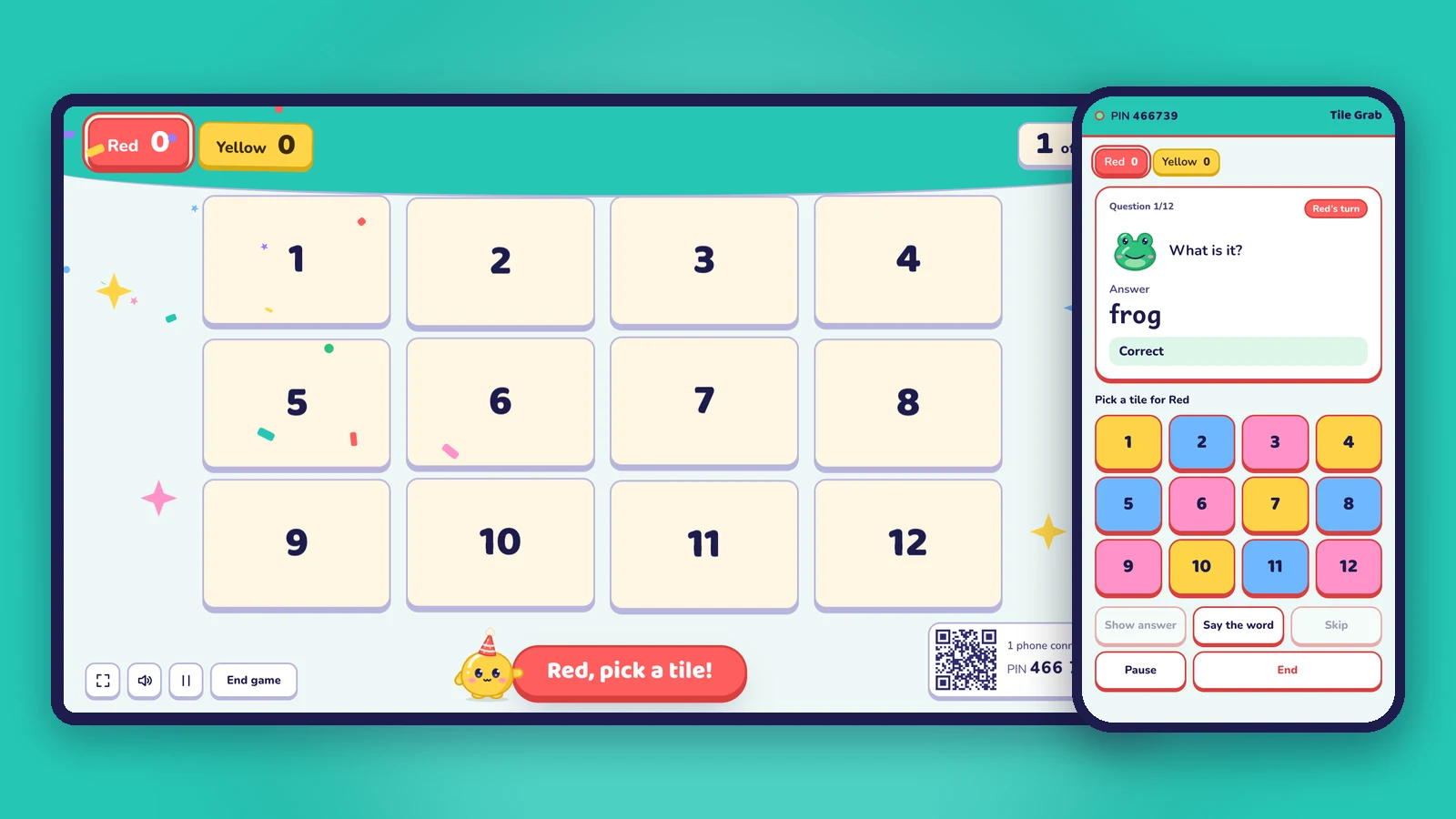
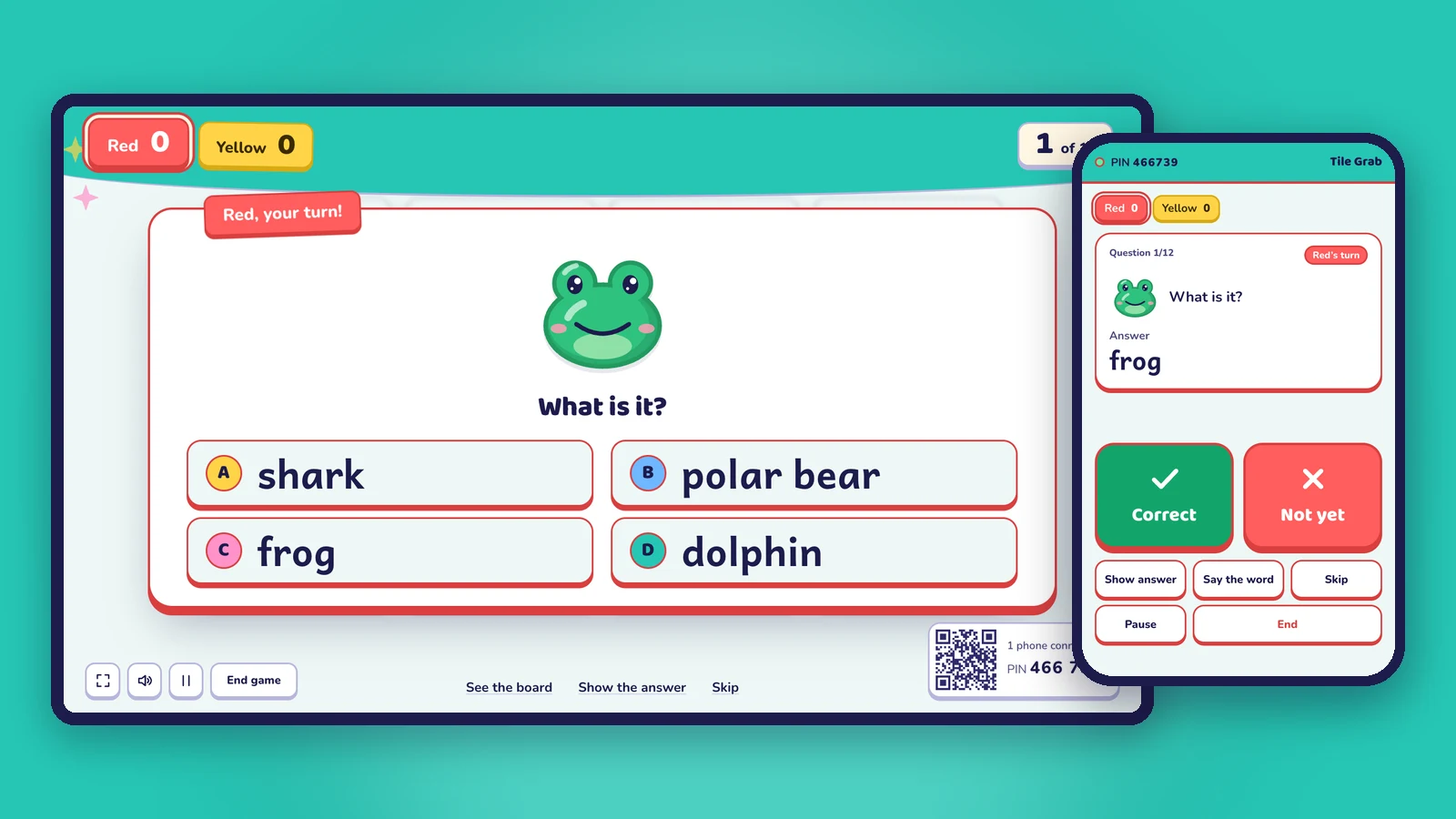
- See the answer first. The phone shows the question and its answer, so you can check a spoken answer without saying it out loud.
- Correct / Not yet. Two big buttons mark the team's answer. Points, sounds and confetti happen on the big screen.
- Show the answer to the class when everyone is stuck.
- Say the word. Oly reads the word aloud again, for listening and pronunciation.
- Pick for the team. In games with a choice (a tile, a shot, a column, a wheel spin), the choices appear on your phone as big colorful buttons.
- Skip, pause and end the game, so you can stop for a discussion and pick up where you left off.
Why it matters in a real classroom
- You stay with your students. Walk between desks, stand next to the quiet group, or let a student be the "host" while you help.
- Answers stay secret. The class never sees the answer on the screen before it's time.
- Fewer lost minutes. No running back to the keyboard after every question.
- Calmer games. You decide when to move on. Nothing happens on the big screen until you tap.
No phone at hand? The big screen works on its own too: tap the buttons on a touch screen, or use the keyboard (C for correct, X for not yet, R to show the answer, Space for next). A presenter clicker works as well.
Step 1: Make a question set from any lesson
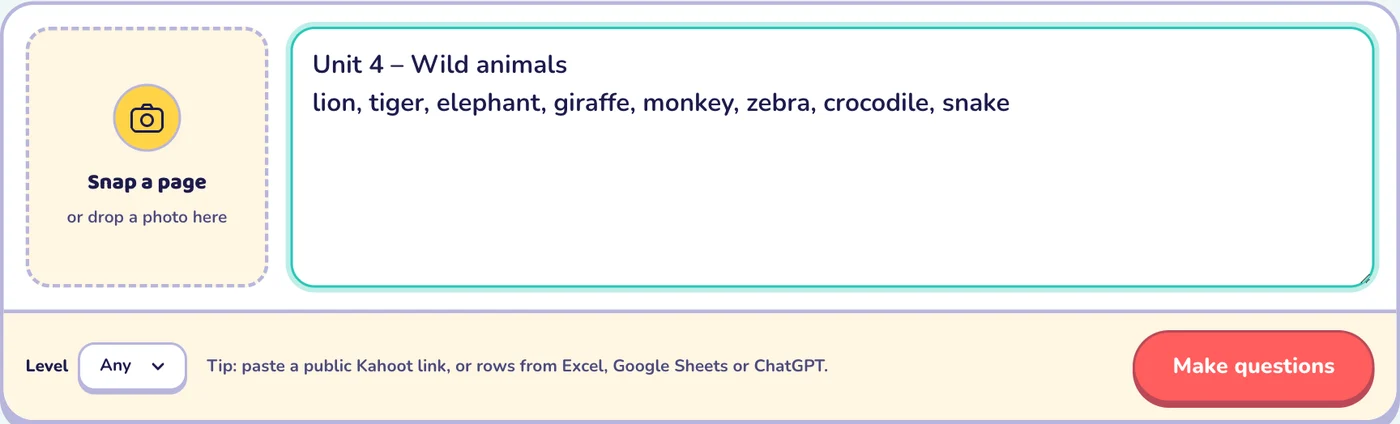
Open Make a game and choose how to start:
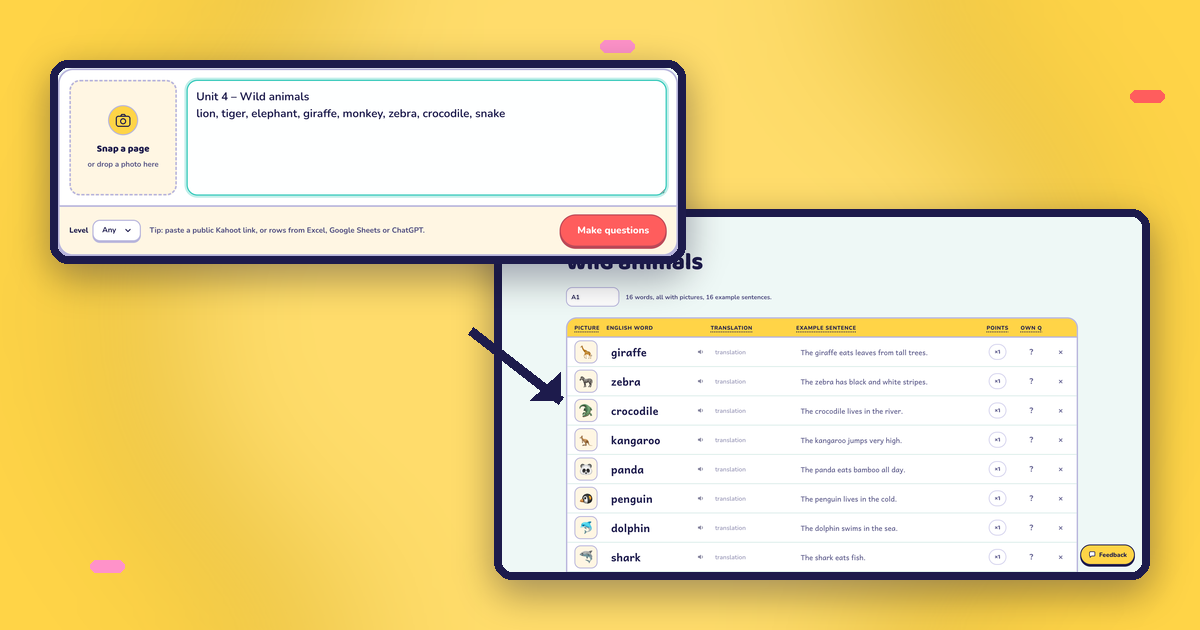
- Snap a page. Take a photo of the textbook page you're teaching. Oly reads the words and builds questions from them. The photo isn't kept.
- Paste a word list. For example: lion, tiger, elephant, giraffe, monkey, zebra.
- Type a topic. "Animals", "weather", "fractions", "the water cycle": Oly picks the words and writes the questions.
- Paste your own questions, one per line:
question | answer | wrong, wrong. Rows copied from Excel, Google Sheets or ChatGPT work too. - Paste a public Kahoot link to bring an existing quiz into Oly.
For English, choose a level from Pre-A1 to B1, and Oly keeps the words and sentences at that level. For other subjects, choose the grade and the language your class learns in.
Step 2: Check and edit the questions
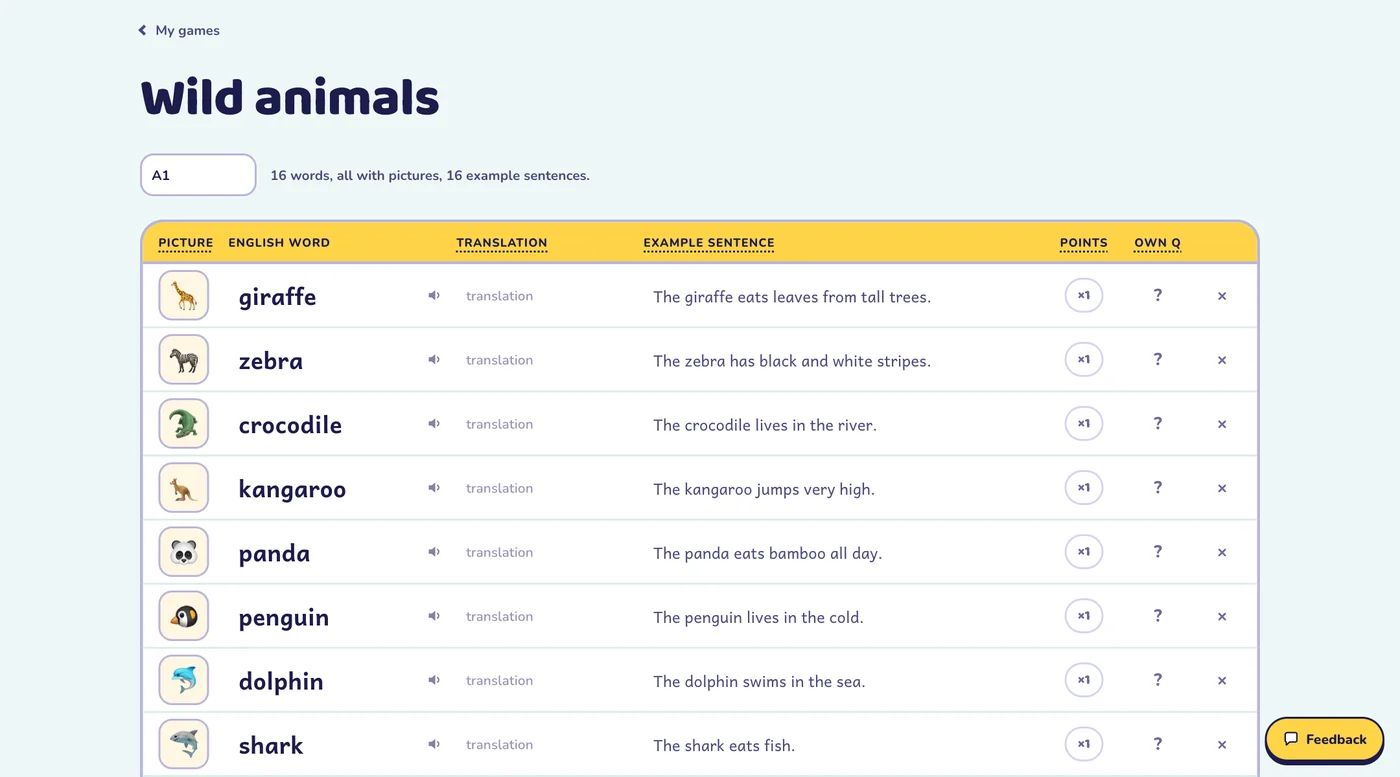
Before you play, you get the whole set in an editor. You can:
- change a word, its picture or its example sentence;
- listen to how each word is read aloud;
- make a question worth double or triple points;
- write your own question for any word;
- add or remove words.
Your games are saved in My games. Sign in with Google and they follow you to every computer and phone.
Step 3: Pick a game
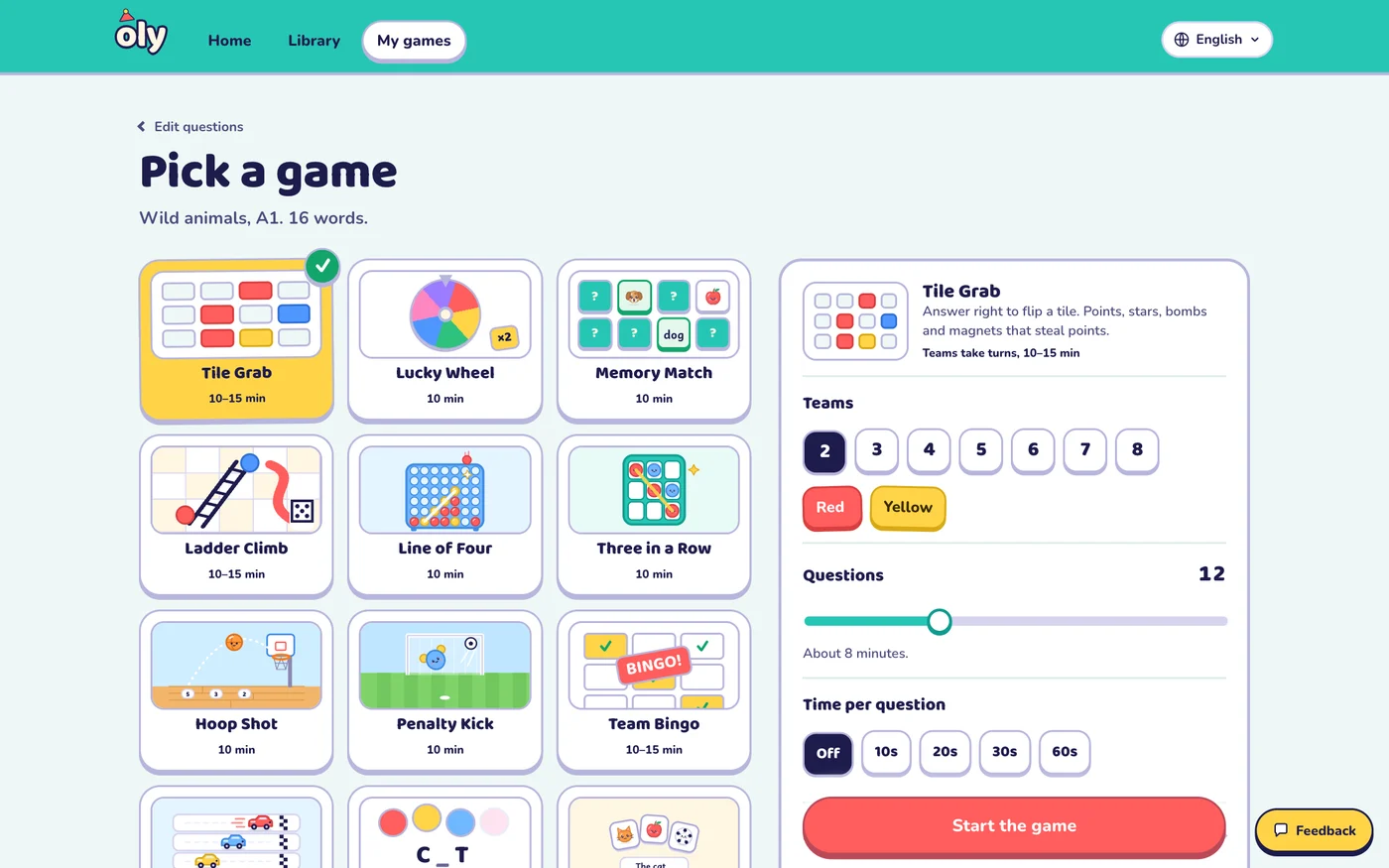
Every game works with every question set, so you can play the same words five different ways in a week. Most games take 10 to 15 minutes.
| Game | What happens | Great for |
|---|---|---|
| Tile Grab | A right answer flips a tile: points, stars, bombs or magnets | Any lesson, big classes |
| Lucky Wheel | A right answer spins the wheel: points, double, swap with the leader | Exciting reviews |
| Memory Match | A right answer flips two cards; find the word and its picture | Vocabulary |
| Ladder Climb | Roll the die, climb ladders, slide down slides | Young learners |
| Paper Race | Right answers move your car; last place gets a boost | Close, fun finishes |
| Line of Four | Drop a disc; four in a row scores big | Strategy fans |
| Three in a Row | Place your team sticker on a 3×3 board | Short lessons |
| Hoop Shot | Choose a close, middle or far shot | Sporty classes |
| Penalty Kick | Shoot left, right or for the top corner | Sporty classes |
| Team Bingo | Every team has a card; each answer stamps all cards | Listening and review |
| Mystery Picture | Right answers peel pieces off a hidden picture | Guessing and discussion |
| Balloon Words | Guess the word letter by letter before the balloons pop | Spelling (English) |
| Listen and Touch | Oly says a word; students race to touch its picture | Listening (English) |
| Pop the Word | Critters pop up with pictures; tap the word you hear | Touch screens (English) |
| Picture Dice | Roll three picture dice and make a sentence or story | Speaking (English) |
Then set up the class:
- Teams: 2 to 8, with your own team names.
- Questions: how many to play (Oly shows how long that takes).
- Timer: off, or 10, 20, 30 or 60 seconds per question.
- Steal: after a wrong answer, another team can steal the points.
- Classroom options: hide the score, switch off single power-ups, calm or no effects, and seasonal themes such as Lunar New Year, winter holidays and Halloween.
Step 4: Play on the big screen
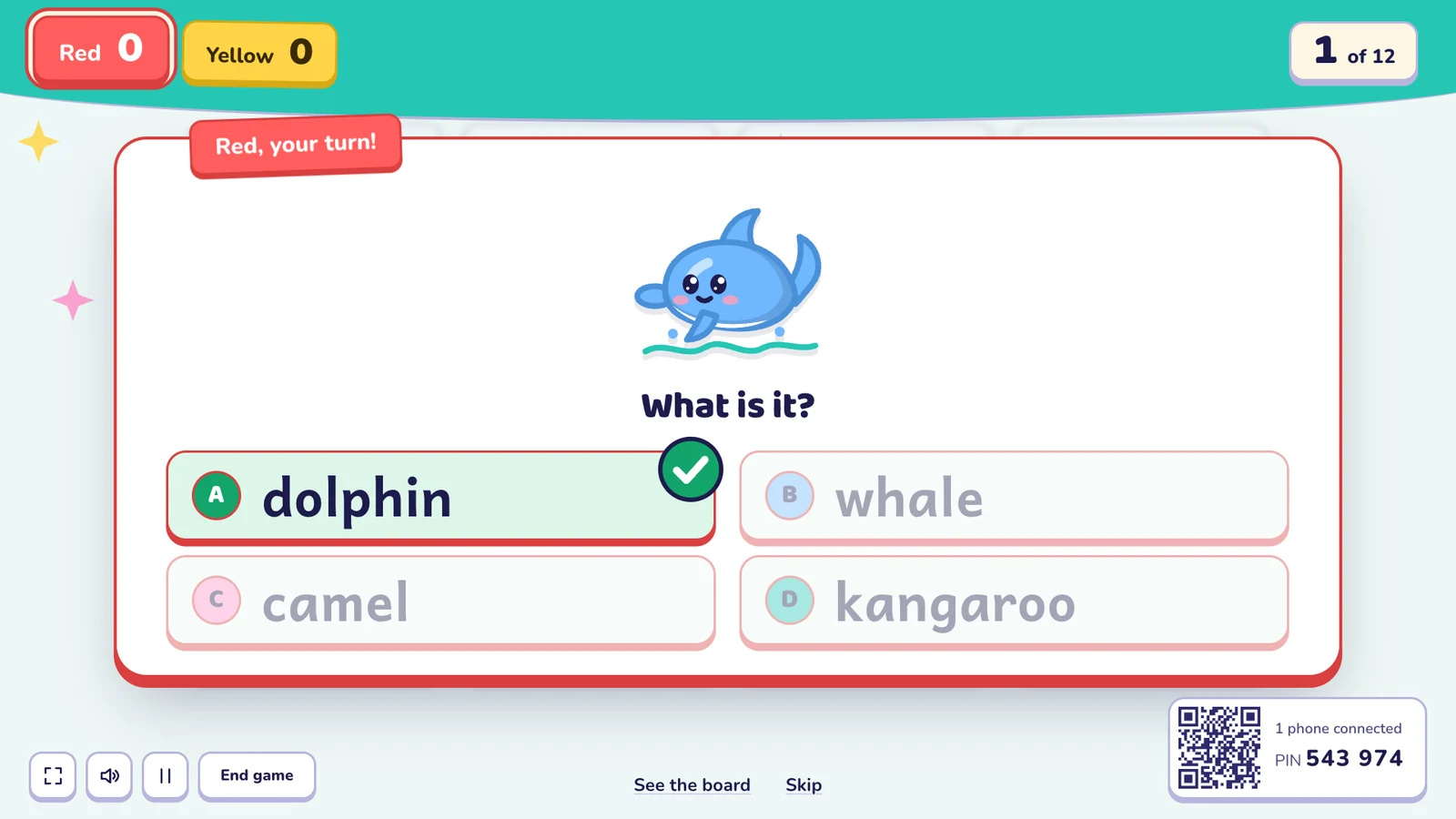
Press Start the game. The teams slide in, Oly counts "3, 2, 1, Go!", and the first team gets a question. Questions change format as you play, so students meet the same words in different ways:
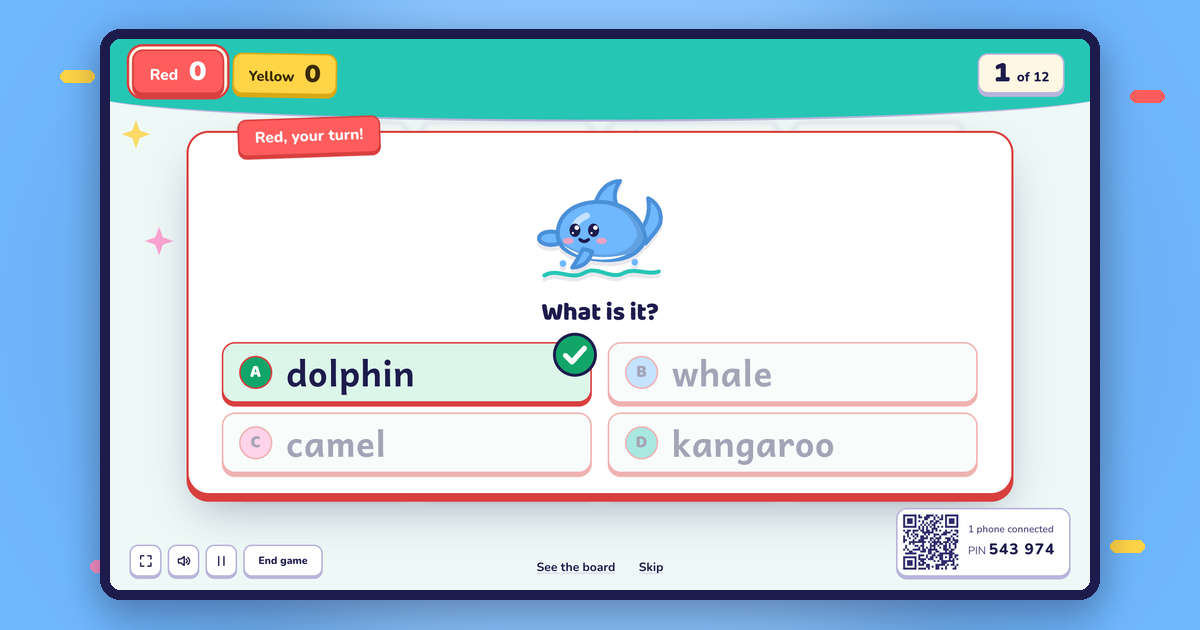
- Picture: "What is it?" with four answers.
- Listen: Oly says the word; students choose the picture.
- Spelling: which letter is missing?
- Meaning, sentences and word order for higher levels.
- Multiple choice, true or false and open questions for other subjects.
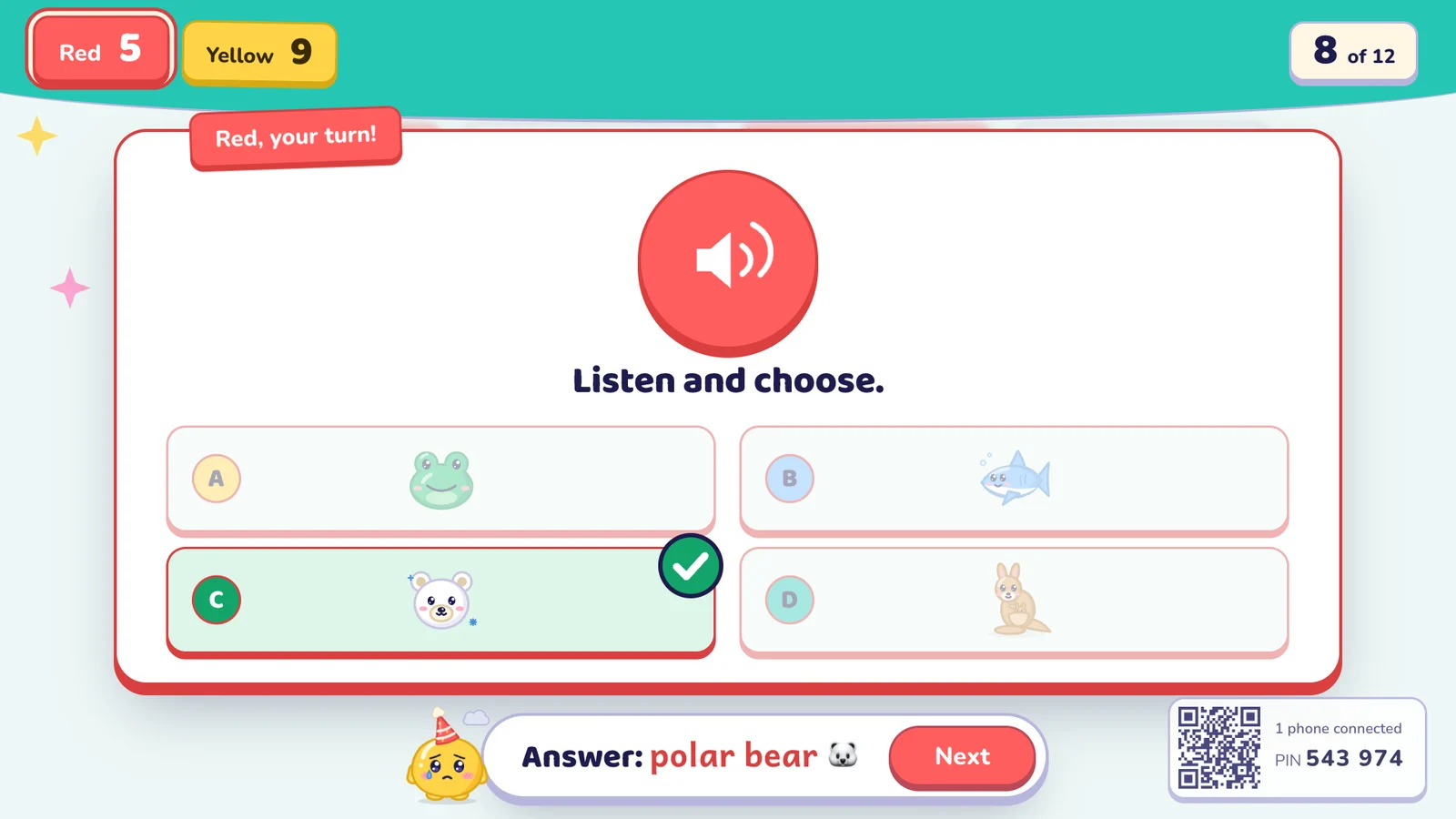
Students can answer out loud, hold up cards, or come up and tap the screen. On an interactive whiteboard everything on the board can be touched.
Step 5: See the results and what to review
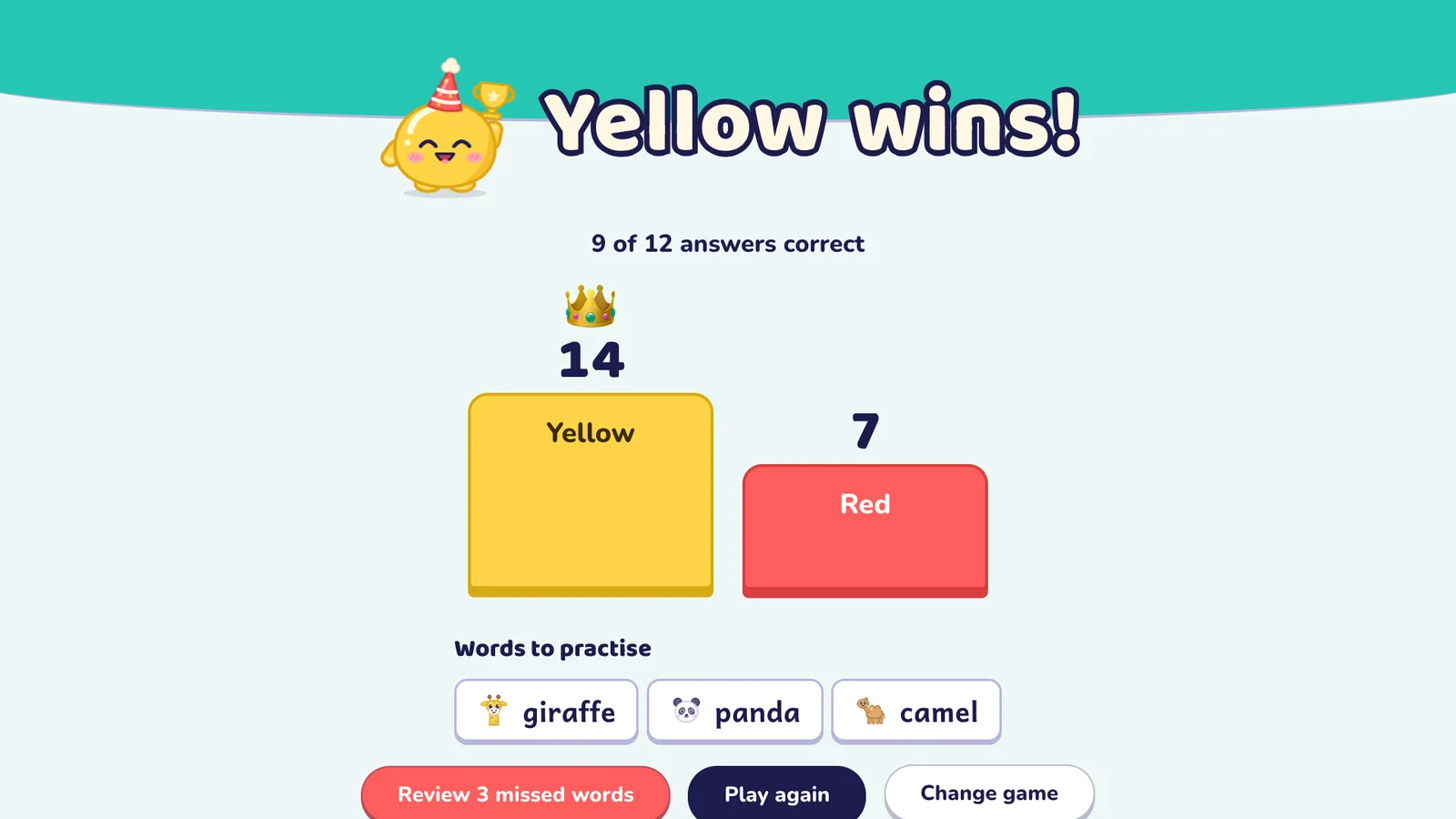
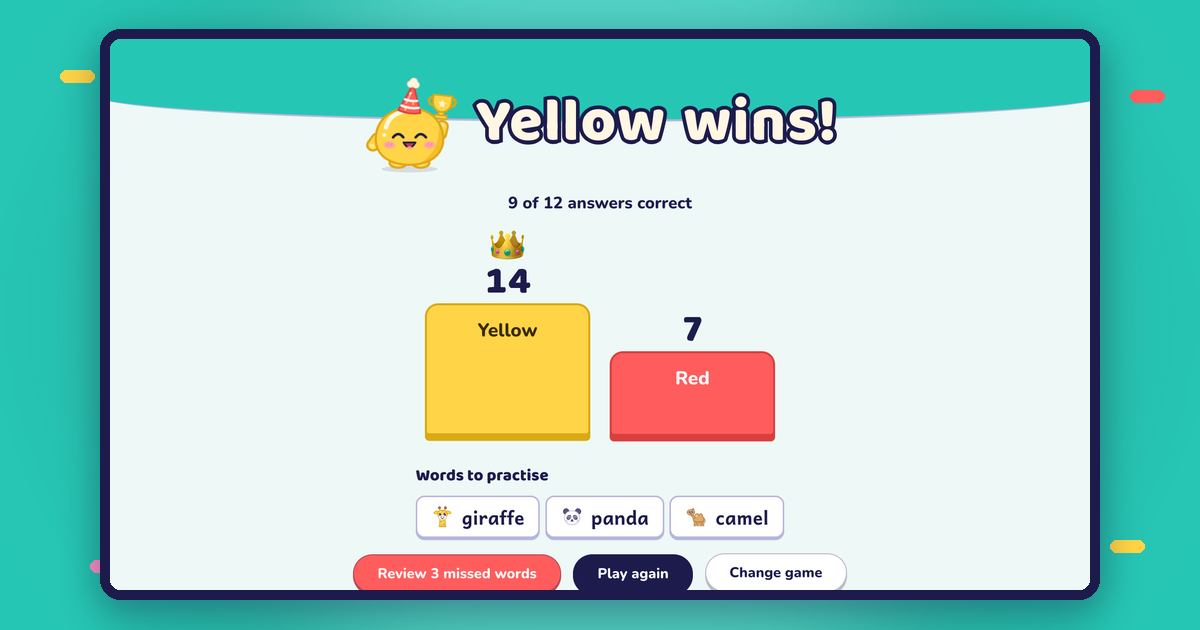
At the end, Oly shows the winning team and how many answers were right. Below the podium you get the words to practise: the ones the class missed. One tap makes a new game from just those words, so tomorrow's warm-up is ready.
You can also play again with a fresh order and new question formats, or change game to play the same set another way.
The ready-made library
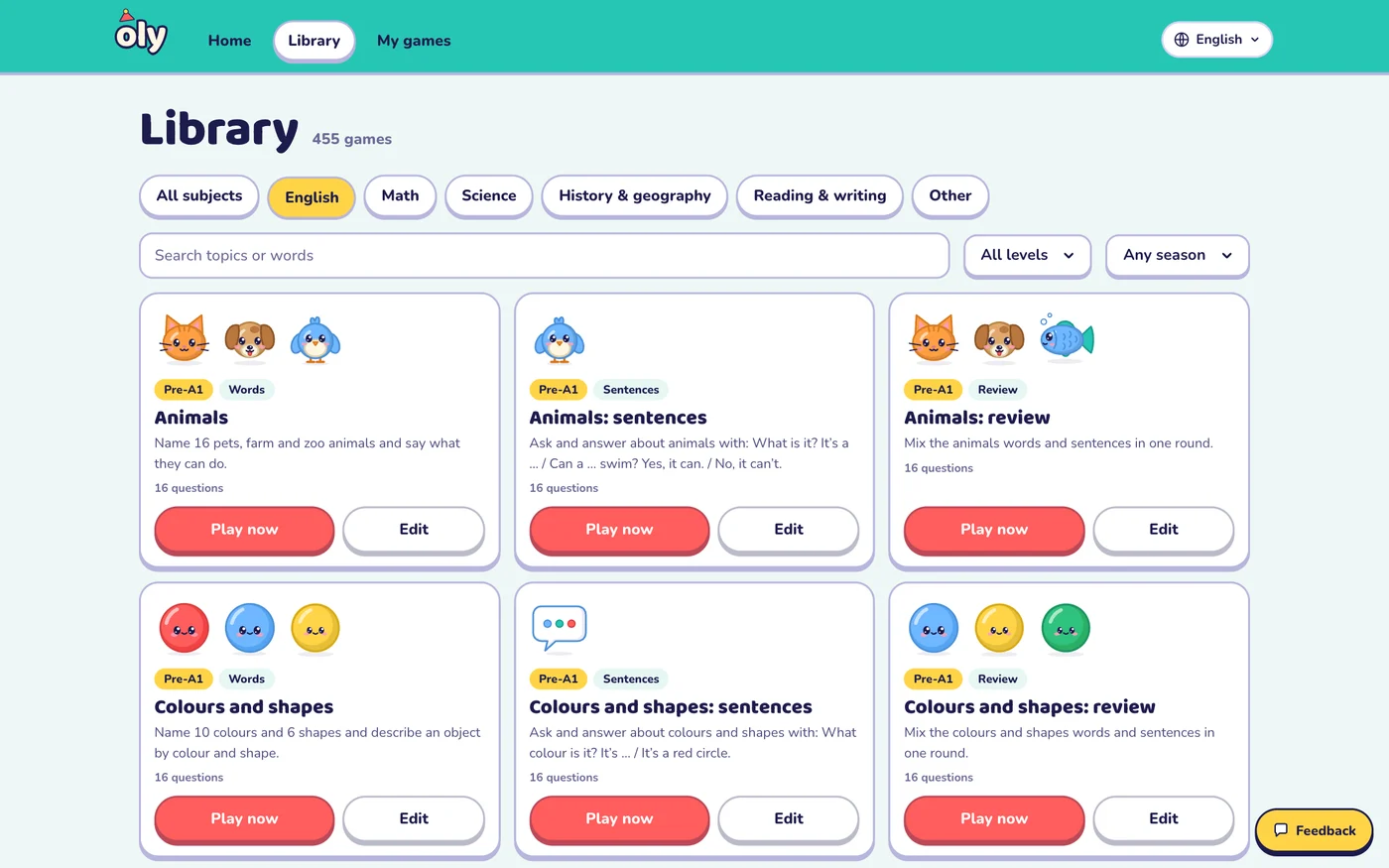
No time to make a game? The library has hundreds of ready-made sets, each checked by a person:
- English from Pre-A1 to B1: vocabulary, sentence practice, grammar, phonics and review games.
- Math, science, history and geography, reading and writing for grades 1 to 9.
- Seasonal collections for back to school, Halloween, Christmas, Lunar New Year and more.
Press Play now to start straight away, or Edit to copy a set and make it yours.
Not just English
English is where Oly started, and some games are made for English practice (listening, spelling and speaking). But 11 of the 15 games work with any subject. Pick Math, Science, History & geography, Reading & writing or Other, and Oly writes multiple choice, true or false and open questions. The game screen speaks your class's language; English games always stay in English.
What you need
| You need | Notes |
|---|---|
| One big screen | A projector, a TV or an interactive whiteboard |
| A computer with a browser | Chrome, Edge, Safari or Firefox; nothing to install |
| Your phone (optional) | The remote; any smartphone with a camera or a browser |
| Speakers (optional) | For read-aloud, music and sound effects |
| Student devices | Not needed |
Free and Pro
| Free | Oly Pro | |
|---|---|---|
| AI question sets a month | 10 (3 from photos) | 300 (100 from photos) |
| Saved games | 15 | 500 |
| Teams per game | Up to 4 | Up to 8 |
| All 15 games and the library | Yes | Yes |
| Price | $0 | $36 a year or $4.99 a month |
Prices are adjusted for many countries. Schools and language centers can ask for a team plan.
Safe for schools
- Students never sign in and never type anything on their own devices.
- Student names stay on your device. The class roster you type for picking players is never sent to our servers.
- Textbook photos aren't kept. They are only read to make the questions.
- No ads, and your content is never used to train AI models.
Frequently asked questions
Do students need phones or tablets?
No. The whole class plays on one shared screen. Teams answer out loud, and you mark answers on your phone or on the screen.
Do the phone and the computer need the same Wi-Fi?
No. They meet through olyclass.com, so the phone can be on mobile data while the computer uses the school network.
Can I use Oly without a phone?
Yes. Use the buttons on the screen, a touch screen, the keyboard or a presenter clicker.
Which ages is Oly for?
Children and teens: English from first words (Pre-A1) to B1, and school subjects for grades 1 to 9. Many teachers also use it with adult beginners.
How long does it take to make a game?
About a minute from a photo, a word list or a topic, plus any time you want to spend editing.
Is Oly free?
Yes. You can play every game and the whole library for free, and make 10 AI question sets a month. Oly Pro raises the limits for teachers who make games every day.
Try it in your next lesson
Pick the page you're teaching tomorrow, make a game, and keep your phone in your hand. Or start with a ready-made game from the library. Your next lesson can be a game.