A Jeopardy-style review game for the classroom, with no template to fill in
Pick a tile, win its points: a Jeopardy-style review game for teams on one screen. No template to fill in: make it from any lesson in a minute. Free.
Teachers love the quiz-show board: teams pick a square, answer the question behind it, and win its points. The trouble is the template. Filling in 25 cells of a slide deck takes an evening, and the deck still can't keep score, read words aloud or let you walk around the room.
Oly gives you the same pick-a-tile-for-points feeling without a template. You snap the textbook page, paste a word list, type a topic or paste your own questions; Oly writes the question set; the class plays in teams on one projector, TV or interactive display; your phone is the remote. Two games in particular play like a Jeopardy-style board: Tile Grab and Dare Board.
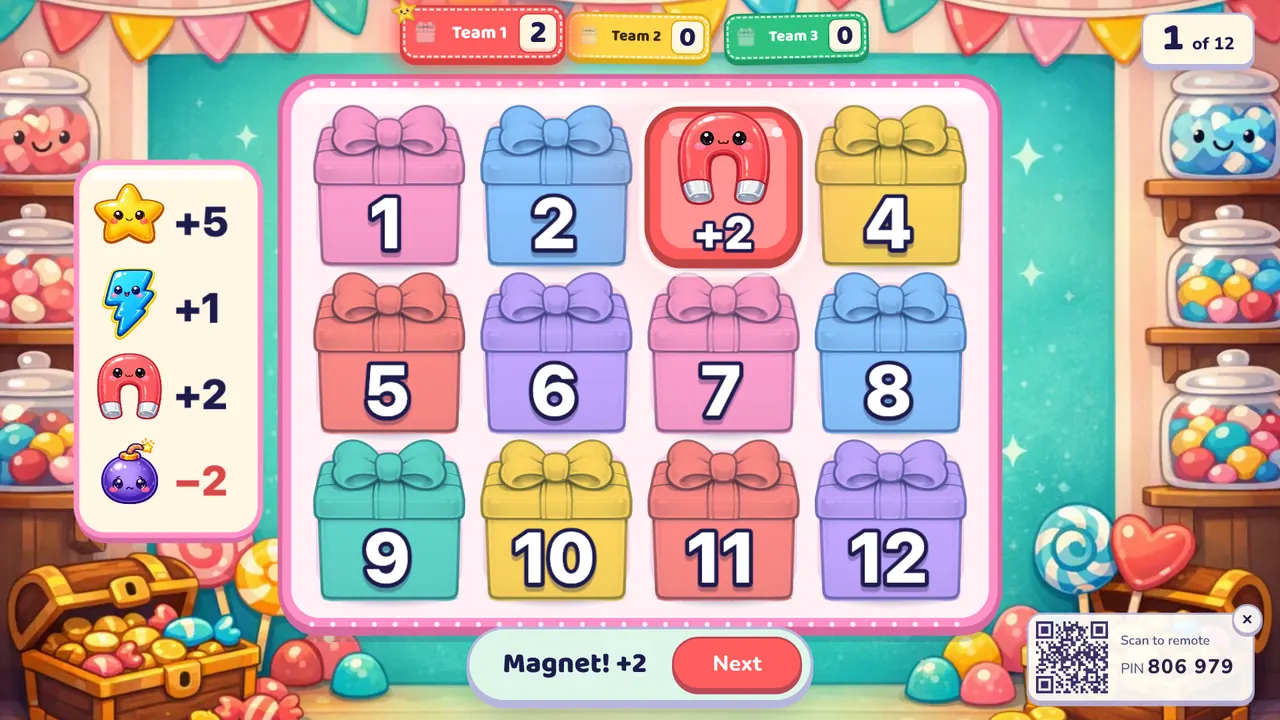
Tile Grab: pick a box, see what you win
In Tile Grab the board is a grid of 12, 16 or 20 numbered boxes. The team whose turn it is answers a question. If the answer is right, the team calls a number, and the box opens:
- Points from +1 to +5 in most boxes.
- A star worth +5, one per board.
- Lightning: +1, and the team plays again.
- A bomb: −2 (scores never go below zero).
- A magnet: takes up to 2 points from the team in the lead.
Because nobody knows what is in a box, a team that is behind can still catch up until the last tile. It is the fastest way to run a review of 12 to 20 questions in about 15 minutes.
Dare Board: choose your value, then answer
Dare Board is the closest to the classic board where higher values mean harder questions. Each tile is worth 1 to 5 stars, and the team picks a tile before it sees the question. Oly ranks your questions from easiest to hardest before the game, so a 1-star tile brings an easy question and a 5-star tile brings one of the hardest in the set.
- A right answer wins the tile in the team's colour, with its points.
- A wrong answer burns the tile, and nobody gets it (unless you switched on steal).
- One tile hides a Double dare worth twice its points.
Teams start to plan: "We're behind, let's go for a 5." That small decision is a good habit for review, because students have to judge what they really know.
How it compares with a slide template
| Slide template | Oly | |
|---|---|---|
| Making the board | Type every question into every cell | Snap a page, paste words or type a topic; edit what Oly writes |
| Score | You keep it on the whiteboard | Kept on screen for 2 to 8 teams |
| Pictures and sound | Add them by hand | A picture and pronunciation for each English word |
| Running the game | Click on the laptop | Your phone shows the answer first; tap Correct or Not yet |
| Reuse | One deck, one game | The same set plays in all 27 games |
What Oly doesn't have is the category columns of the TV show. If you want topics, make a short set per topic and play one round each, or mix them in one set and let Dare Board sort the questions by difficulty.
Make a Jeopardy-style game in three steps
- Make the question set. Make a game from the page you are reviewing, a word list or a topic. For math, science, history and geography or reading and writing, choose the subject and paste your own questions as
question | answer | wrong, wrong; a line ending intrueorfalsebecomes a true/false question. Or open a ready set from the library. - Pick Tile Grab or Dare Board, the number of teams and a timer if you want one (10 to 60 seconds).
- Play. Scan the QR code with your phone. After a right answer, the team calls its tile and you tap it on your phone.
Rules that make it feel like a quiz show
- A final question that counts more. Mark the last question (or the key ones) as a double or triple question in the editor. The points the team wins are multiplied.
- Steal. Switch it on, and after a wrong answer another team can answer the same question. Every team has a reason to listen.
- Wrong answers lose a point if you want more risk (off by default).
- Hide the score for younger classes when winning matters too much.
- Power-ups: in Tile Grab, switch off the bomb or the magnet one by one if they upset your class.
Other games with the same energy
- Prize Climb: each right answer climbs a prize step, and the team decides to bank its points or risk them. Three lifelines per team: 50:50, Swap and Ask the class.
- Lucky Wheel: a right answer spins the wheel for points, a double or a swap with the leader.
- Ring the Bell: every team writes every answer on a mini whiteboard, so you check the whole class at once.
For a full review lesson, see review games before a test, and for running a fair, calm game, the guide to classroom management games.
Frequently asked questions
Is this the official Jeopardy! game?
No. Jeopardy! is a trademark of its owner, and Oly is not connected with it. Tile Grab and Dare Board are Oly's own games that share the familiar idea of picking a tile for points.
Is there a Jeopardy template I need to fill in?
No. You don't fill in a board. Oly builds the questions from a page, a word list or a topic, or from questions you paste, and every game lays out its own board.
Is it free?
Yes. Every game and the library are free to play with up to 4 teams, and the free plan makes 10 AI question sets a month. Your own pasted questions for subject sets don't need the AI. Oly Pro allows up to 8 teams and more AI sets.
Do students need devices?
No. The class plays in teams on one shared screen. Only you use a phone, as the remote, and the keyboard works too (C for correct, X for not yet, Space for the next question).
How many questions do I need?
Tile Grab plays well with 12 to 20 questions. Dare Board has one tile per question, up to 25.