Animal and Plant Cells in 3D
A free 3D cell model for class: turn, zoom and cut open an animal or plant cell, tap each organelle to learn its job, compare the two cells and play Find it.
Free, no sign-up, runs in the browser on a projector, TV or touch screen.
Make a review gameFree games library
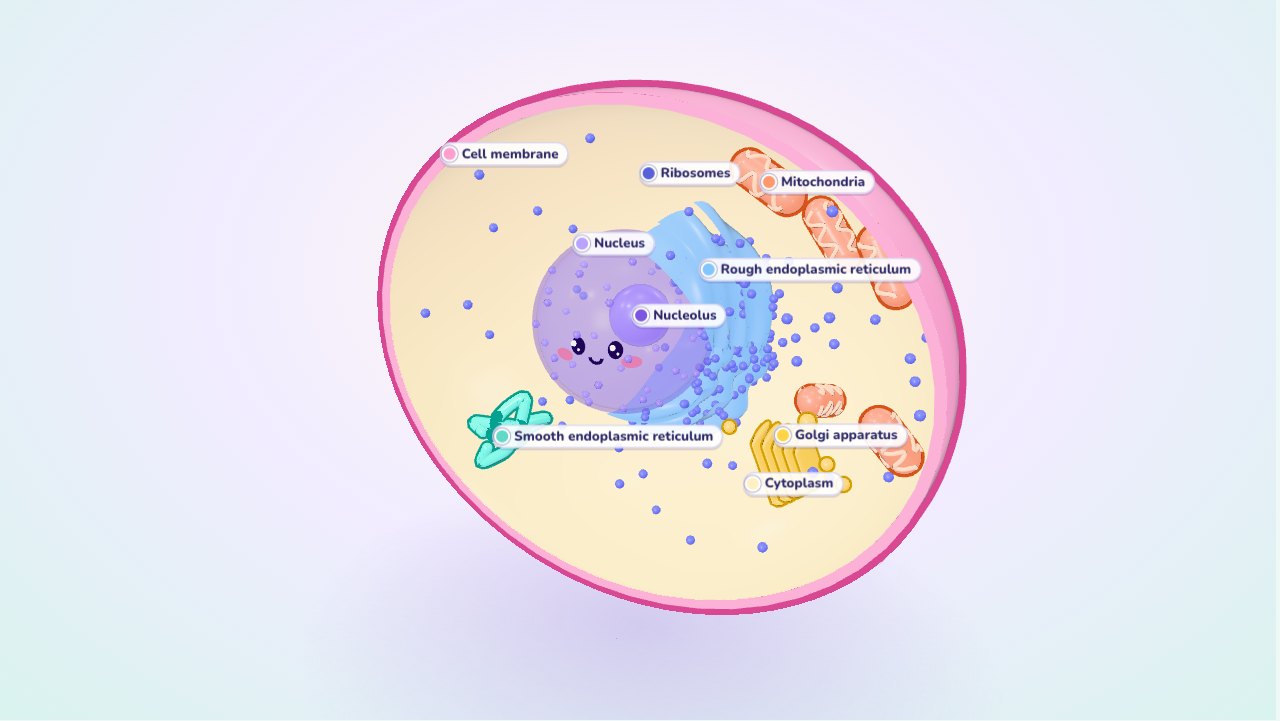
This is a cell the whole class can hold in its hands, on a projector, TV or interactive whiteboard. A big, glossy animal cell sits on the screen: drag it to turn it, pinch or scroll to zoom in, and pull the "Cut open" slider to slice it like a cake and look inside. Tap any part and it glows while the rest fades, and a card gives its name, its job in one line and its real size. Switch to the plant cell to see the cell wall, the chloroplasts and the big central vacuole, then press Compare to put both cells side by side. When the class knows the parts, press Find it: Oly asks for one organelle at a time, and a student comes to the board to tap it.
How to use it
- Turn and zoom: drag the cell with a finger or the mouse to turn it in 3D. Pinch with two fingers, or scroll the mouse wheel, to zoom in and out (touch the cell once first, so the page still scrolls normally).
- Cut it open: the "Cut open" slider at the bottom slices off the front of the cell. At 0 the cell is closed and you see only the outside; at 100 you see half the cell, with the cut wall, membrane and vacuole as flat rings. The nucleus turns see-through as you cut, so the nucleolus shows inside.
- Tap a part: it glows, the others fade, and the card on the right shows what it is, what it does, its real size and how many a cell has. Tap it again, tap empty space or press Esc to see the whole cell again. The buttons under the cell pick the same parts, one per organelle.
- Animal cell and Plant cell: switch at the top. Each cell has its own parts, in their real places: in the plant cell, the vacuole pushes the nucleus to the side and the chloroplasts lie along the wall.
- Compare: both cells side by side. What only plant cells have (cell wall, chloroplasts, one large vacuole) and what only animal cells have (lysosomes, small vacuoles) glow; the parts they share fade. The card lists the three groups; tap a name to light it up in both cells.
- Labels: switch the name tags on and off. Turn them off to ask "What is this one?"
- Find it: a quiz for the class. Oly asks "Tap the Golgi apparatus", a student taps. Right, and it flashes green; wrong, and Oly says what was tapped ("That is a lysosome. Try again!"). After two misses the answer glows. At the end you see how many were found on the first try.
- Keyboard and projector: the full screen button in the top right makes everything bigger. Arrow keys turn the cell, + and − zoom, [ and ] cut, 1, 2 and 3 switch Animal, Plant and Compare, L shows the labels, F starts Find it, Tab walks through the buttons.
What is in an animal cell and a plant cell
Every living thing is made of cells. Most are far too small to see: an animal cell is about 10 to 30 micrometres across (a micrometre, µm, is a thousandth of a millimetre), so about fifty of them in a row would fit across one millimetre. Inside, the cell has small parts with their own jobs, called organelles.
| Part | Job | Animal cell | Plant cell |
|---|---|---|---|
| Cell membrane | Controls what goes in and out | yes | yes |
| Cytoplasm | Jelly where the organelles sit and many reactions happen | yes | yes |
| Nucleus (with the nucleolus) | Holds the DNA and controls the cell | yes | yes |
| Mitochondria | Release energy from food by respiration | yes | yes |
| Ribosomes | Build proteins | yes | yes |
| Endoplasmic reticulum (rough and smooth) | Makes and carries proteins (rough) and lipids (smooth) | yes | yes |
| Golgi apparatus | Packs proteins and sends them on | yes | yes |
| Lysosomes | Break down waste and worn-out parts | yes | rarely (the vacuole does this) |
| Vacuole | Stores water and substances | small, if any | one large central vacuole |
| Chloroplasts | Make food by photosynthesis | no | yes |
| Cell wall | Supports and protects the cell, keeps its shape | no | yes (cellulose) |
So the three big differences are: plant cells have a cell wall, chloroplasts and a large central vacuole; animal cells have none of these. That is why a plant cell keeps a boxy shape and a leaf is green, while animal cells are rounder and can change shape. Many textbooks also list centrioles as an animal-cell part (they help the cell divide); this model leaves them out to keep the picture clear.
Sizes: what is true to scale
The model is built in micrometres, with typical sizes from BioNumbers and the OpenStax Biology textbook:
- Animal cell: about 20 µm across; nucleus about 6 µm, close to a third of the cell's width, as in real cells; nucleolus about 2 µm.
- Mitochondria: about 1 µm wide and 2–3 µm long. A real cell has hundreds to thousands; the model shows a dozen.
- Plant cell: about 30 µm long (real ones are 10–100 µm). The central vacuole fills about a third of it (in real cells often 30–80%), and the chloroplasts, about 5 µm long, lie in the thin layer of cytoplasm between the vacuole and the wall.
- Drawn bigger than life: ribosomes are only 25–30 nanometres, a thousandth of the cell, and the membrane is 7–10 nm thick. At true scale you could not see them, so the model draws them about ten times bigger, and says so on their cards.
Teaching ideas
The simulation fits the cells units of middle school life science (NGSS MS-LS1-1 and MS-LS1-2: cells as the units of life, and the functions of the cell's parts), KS3 biology and the first cell lessons of any secondary course.
- Warm-up (3 minutes): show the closed animal cell, labels off. Ask: "What do you think is inside?" Then pull the Cut open slider slowly while the class watches.
- Tour the parts (10 minutes): labels on. Tap the nucleus, the mitochondria and the cell membrane, and read the cards together. Ask a student to explain each job in their own words: "the nucleus is the boss", "the mitochondria are the power stations".
- Plant versus animal (8 minutes): switch to the plant cell. Ask: "What is new here?" Students point at the wall, the green chloroplasts and the big vacuole. Then press Compare and check with the card.
- Why? (5 minutes): "Why do plant cells need chloroplasts but animal cells do not? Why does a plant need a wall, when we have a skeleton?" Turn the plant cell to show how the wall gives it a fixed shape.
- Find it in teams (10 minutes): labels off, press Find it. Teams take turns sending a student to the board; count the first-try finds.
- Review (10 minutes): make a review game: the whole class plays on the same screen in teams, with your phone as the remote.
Questions teachers ask
What are the main differences between animal and plant cells?
Plant cells have three things animal cells don't: a cell wall made of cellulose outside the membrane, chloroplasts for photosynthesis, and one large central vacuole full of cell sap. Animal cells have lysosomes and, if any, only small vacuoles. Both have a membrane, cytoplasm, a nucleus, mitochondria, ribosomes, endoplasmic reticulum and a Golgi apparatus.
Do plant cells have mitochondria?
Yes. A common mistake is to think that chloroplasts replace mitochondria. Chloroplasts make sugar from light; mitochondria release the energy stored in that sugar by respiration, day and night. Plant cells need both, and the model shows both.
Is the model to scale?
The big parts are: the cell, nucleus, nucleolus, mitochondria, chloroplasts and the plant's vacuole keep their real proportions, in micrometres. Ribosomes, membranes and the ER are far too thin to see at that scale, so they are drawn about ten times bigger. The card of each of those parts says so.
Why does the nucleus have a face?
To make the cell friendly for younger classes, and to give students a landmark: the nucleus is the cell's "control centre", the part that holds the DNA. The face stays small and turns see-through with the rest of the nucleus when you cut the cell open, so the nucleolus inside stays visible.
Does it work on an interactive whiteboard or a slow school laptop?
Yes. It runs in the browser with no install and no sign-up. Drag with one finger to turn the cell and pinch with two to zoom. The 3D scene keeps its detail moderate and limits the pixel count, so it stays smooth on ordinary school laptops and large touch panels.