Build an Atom Simulation
A free build-an-atom simulation for class: drag protons, neutrons and electrons into an atom, see the element, mass number, charge, shells and stability.
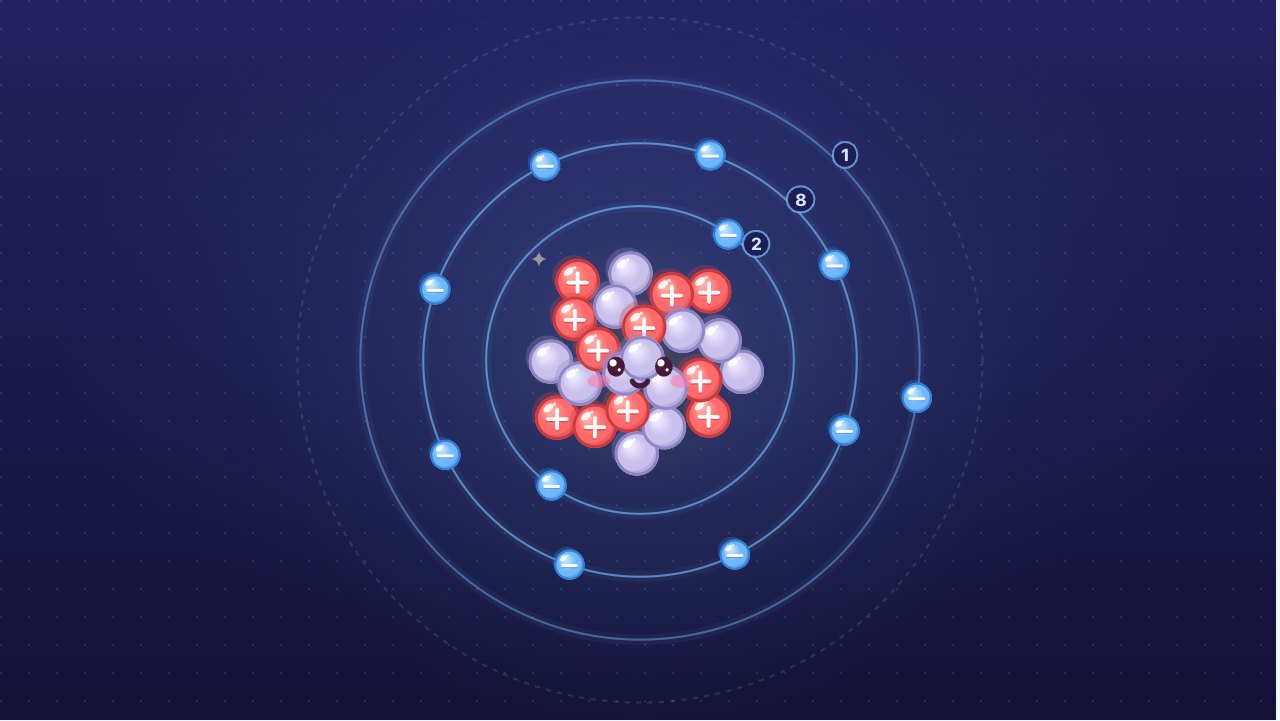
Free, no sign-up, runs in the browser on a projector, TV or touch screen.
Make a review gameFree games library
This is an atom-building kit for the whole class on one screen. Tap or drag protons, neutrons and electrons from three bins into the atom, and it builds itself: protons and neutrons cluster into the nucleus in the middle, and electrons settle onto shells around it and slowly orbit. As the counts change, the panel tells you what you made: the element and its symbol, the mass number, the charge, the electron shells and whether the nucleus is stable. Add one proton too many and carbon turns into nitrogen; take an electron away and the atom becomes a positive ion.
How to use it
- Add particles: tap a bin to add one particle, or drag it from the bin and drop it on the atom. Protons always go to the nucleus, electrons to the next free place on the shells.
- Take particles out: tap any particle in the atom to send it back to its bin, or drag it out of the atom. The small − button on each bin takes out the last one you added.
- Read the atom: the panel shows the element tile with its mass number and atomic number (¹²₆C), the name ("Carbon-12"), whether it is a neutral atom or an ion, the mass number A = p + n, the mass in amu, the charge p − e, the shells (2, 4), and whether the nucleus is stable, with its share of the element on Earth or its half-life.
- The first 20 elements: the mini periodic table lights up the element you built. Tap an element to build its most common atom in one go.
- The face: a stable nucleus smiles. An unstable one looks worried and trembles.
- Challenge: switch to Challenge and the class gets a task such as "Build a carbon-12 atom" or "Build an Na⁺ ion". The element, mass and charge are hidden, so students have to count. Press Check: Oly says what to fix first (the element, the neutrons or the electrons), and a right answer gets confetti.
- Keyboard and projector: P, N and E add a proton, neutron or electron; Shift with the same key takes one out. The full screen button in the top right makes everything bigger for the back row.
What an atom is made of
An atom has a tiny nucleus in the middle and electrons around it. The nucleus holds two kinds of particles:
| Particle | Where | Charge | Mass |
|---|---|---|---|
| Proton (p) | Nucleus | +1 | about 1 amu |
| Neutron (n) | Nucleus | 0 | about 1 amu |
| Electron (e) | Shells around the nucleus | −1 | about 0.00055 amu, almost nothing |
The amu (atomic mass unit) is one twelfth of the mass of a carbon-12 atom. Because electrons weigh almost nothing, the mass of an atom in amu is very close to its number of protons plus neutrons.
Protons decide the element
The number of protons is the atomic number Z, and it alone decides the element: every atom with 6 protons is carbon, every atom with 11 is sodium. The simulation finds the element from the proton count, which is why adding one proton changes the name at once.
- Mass number: A = p + n. Carbon-12 has 6 protons and 6 neutrons.
- Charge: p − e. With as many electrons as protons the charges cancel and the atom is neutral.
Isotopes: same element, different neutrons
Atoms of the same element with different numbers of neutrons are isotopes. Carbon-12 (6 neutrons) and carbon-13 (7 neutrons) are both stable. Carbon-14 (8 neutrons) is radioactive: half of any sample decays in about 5,700 years, which is what radiocarbon dating measures. The simulation knows every stable isotope of the first 20 elements and how common each one is on Earth: 98.93% of carbon is carbon-12. Too many or too few neutrons and the nucleus is unstable. Some elements, such as fluorine and sodium, have only one stable isotope.
Ions: gaining or losing electrons
Electrons can be gained or lost without changing the element. An atom that loses electrons has more protons than electrons and becomes a positive ion: sodium loses one and becomes Na⁺. An atom that gains electrons becomes a negative ion: chlorine gains one and becomes Cl⁻. Na⁺ and Cl⁻ together make table salt.
Electron shells: 2, 8, 8
In the simple shell model taught for the first 20 elements, electrons fill shells from the inside out: up to 2 in the first shell, then 8, then 8, then the rest in the fourth. Sodium (11 electrons) is 2, 8, 1; chlorine (17) is 2, 8, 7; calcium (20) is 2, 8, 8, 2. The electrons in the outer shell match the element's group in the short table, and a full outer shell (helium, neon, argon) makes a noble gas. Na⁺ has the same shells as neon (2, 8) and Cl⁻ the same as argon (2, 8, 8).
The shell model is a picture, not the whole truth: in real atoms electrons are spread out in clouds called orbitals, and the nucleus is about 100,000 times smaller than the atom, far too small to draw to scale.
Try this
- Empty the atom and add one proton and one electron: hydrogen-1. Add a neutron: still hydrogen, now hydrogen-2 (deuterium), still stable. Add another: hydrogen-3 (tritium), unstable, with a half-life of 12.3 years.
- Build carbon-12, then add two neutrons. The name changes to carbon-14 but the element stays carbon, and the nucleus starts to worry.
- Build sodium with the table, then take one electron away. The charge becomes +1 and the shells go from 2, 8, 1 to 2, 8, like neon.
- Add electrons to chlorine until its outer shell is full. How many did it take, and what is the charge now?
Teaching ideas
The simulation fits the atomic structure units of middle school science and introductory chemistry: the parts of an atom, atomic number and mass number, isotopes, ions and electron arrangement, as in the atomic structure topic of GCSE Chemistry. In the NGSS it supports MS-PS1-1 (models of atoms and molecules) and HS-PS1-1 (the periodic table and the outer electrons of atoms).
- Warm-up (3 minutes): show carbon-12. Ask: "Which particles are in the nucleus? Which ones are moving round it?"
- What decides the element (5 minutes): ask a student to add one neutron, then one electron, then one proton. Ask: "Which change gave us a new element?"
- Isotopes (7 minutes): build hydrogen-1, then add neutrons one by one. Ask: "Is it still hydrogen? Why is the nucleus worried now?"
- Ions (5 minutes): build sodium and chlorine, move an electron from one to the other in your head, and build Na⁺ and Cl⁻. Compare their shells with neon and argon.
- Challenge in teams (10 minutes): switch to Challenge. Teams take turns at the board building the atom or ion asked for; the class checks before pressing Check.
- Review: make a review game: the whole class plays on the same screen in teams, with your phone as the remote.
Questions teachers ask
Is the information in the simulation correct?
Yes. Element names and symbols follow IUPAC. The list of stable isotopes and how common each one is on Earth come from NIST's atomic weights and isotopic compositions, and the half-lives from the NUBASE2020 evaluation. Potassium-40 and calcium-48 are shown as "radioactive, very slow": they decay, but so slowly that they are still found in nature.
Why do the electrons sit on circles?
This is the simple shell model (the Bohr model) used to teach the first 20 elements: it explains why elements in the same group behave alike. In real atoms electrons do not follow tracks; they are spread out in clouds called orbitals. The model stops at calcium, where the simple 2, 8, 8 pattern stops working.
Why can't I add more than 20 protons?
The simulation covers the first 20 elements, hydrogen to calcium, the ones taught with the shell model. Up to 30 neutrons fit, enough for every isotope of those elements.
What makes a nucleus unstable?
An unstable nucleus has the wrong balance of protons and neutrons, so sooner or later it breaks down and gives out radiation. The half-life is the time for half of the atoms in a sample to do so: about 20 minutes for carbon-11, about 5,700 years for carbon-14. Isotopes not found in nature, like helium-5, fall apart almost at once.
Can students use it on an interactive whiteboard?
Yes. Every finger drags its own particle, so two students can build at the same time, and every particle is big enough to tap. On a phone the bins sit along the bottom. Nothing to install and no sign-up: it runs in the browser and it's free.