Solar System Simulation in 3D
A free 3D solar system simulation for class: the planets where they really are today, time controls, true scale, the Moon's real phase and Saturn's rings.
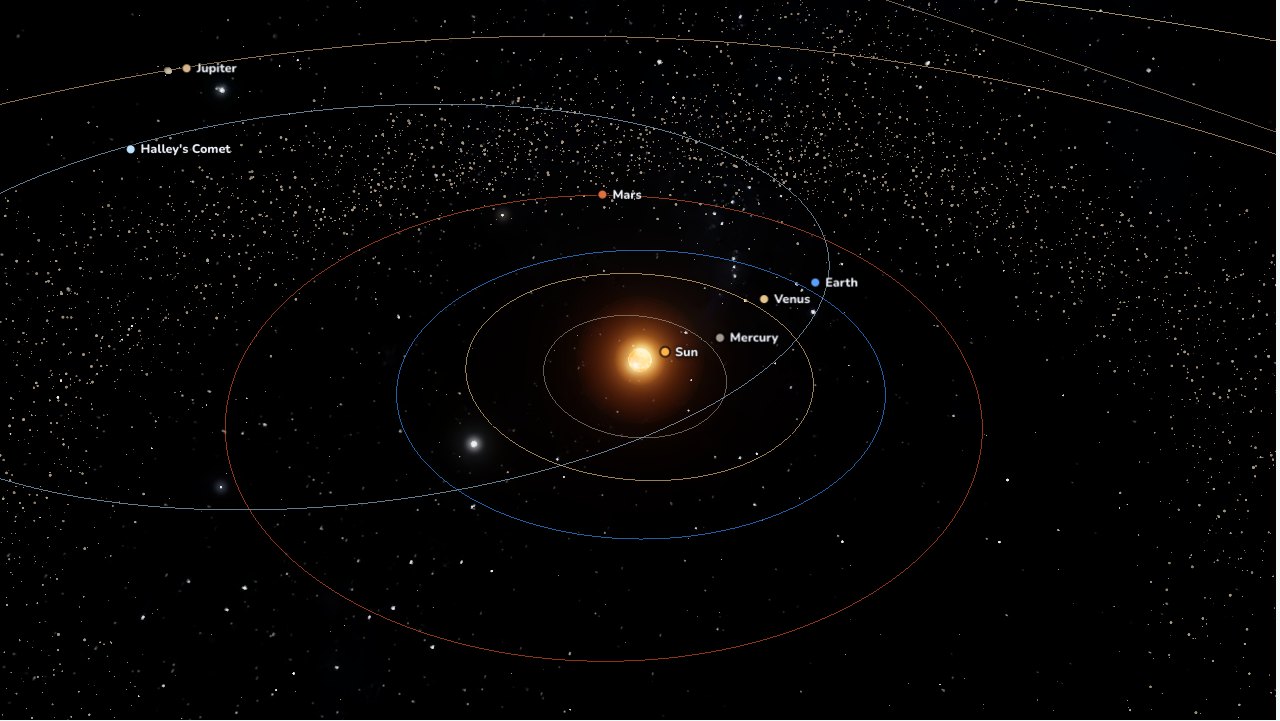
Free, no sign-up, runs in the browser on a projector, TV or touch screen.
Review it as a class gameFree games library
This simulation puts the Sun, the eight planets, the Moon, Pluto and Halley's Comet where they really are in the sky on the date you choose. Open the page and you see today's positions. Speed time up to a year per second, run it backwards, fly to any planet, then switch to true scale and let the class see how big and empty the solar system really is.
How to use it
- Turn and zoom: drag to turn. Click the box once, then scroll, or pinch on a touch screen, to zoom.
- Fly to a body: tap a planet, its name, or a name button along the bottom. The panel shows its diameter, year, day, axial tilt, and its real distance from the Sun and the Earth on the date shown.
- Time: pick a speed from Live (real time) to 1 year per second, tap ◀◀ to run backwards, Today to come back, or choose any date from 1800 to 2199.
- Size: Easy to see enlarges the planets so you can see their surfaces. True scale shrinks them to their real size against the distances.
- Show or hide: orbits, names, and the asteroid and Kuiper belts.
- On a projector: use the full screen button in the top right. Text and buttons grow so the back row can read them. Space pauses, keys 1 to 9 fly to each planet, Esc goes back to the whole system.
What is in the solar system?
The solar system is the Sun and everything that orbits it. The Sun is a star: it makes its own light, and it holds 99.86% of all the mass in the system. Everything else only reflects the Sun's light, which is why each planet always has a lit half and a dark half as you run time.
The eight planets come in two groups:
| Group | Planets | What they are like |
|---|---|---|
| Rocky planets (inner) | Mercury, Venus, Earth, Mars | Small, dense, solid surfaces, few or no moons |
| Giant planets (outer) | Jupiter, Saturn, Uranus, Neptune | Huge, mostly gas or ice, with rings and many moons |
Between Mars and Jupiter lies the asteroid belt. Look closely and you can see gaps in it, where Jupiter's pull has cleared the orbits. The two swarms of rock 60° ahead of and behind Jupiter are the Trojan asteroids, which travel with it. Past Neptune is the Kuiper belt, home to Pluto, a dwarf planet since 2006.
Why are the planets where they are?
Each planet travels on an ellipse, a slightly stretched circle, with the Sun at one focus. The closer a planet is to the Sun, the faster it moves and the shorter its year: Mercury goes round in 88 days, Neptune takes almost 165 years. These are Kepler's laws, and the simulation uses the orbital elements NASA publishes.
Try it: set the date to 16 January 2025 and fly to Mars. The Sun, the Earth and Mars are almost in a straight line, called opposition, when Mars looks brightest in the night sky. The Moon's phase matches the sky too: pick a full moon from a calendar and you will find the Moon on the far side of the Earth from the Sun.
How big is the solar system?
Switch to True scale and the planets all but vanish, leaving only their names. That is not a bug: the solar system is almost all empty space. Shrink it so the Sun is a ball 30 cm across, and:
- the Earth is a 2.7 mm speck, 32 m away;
- Jupiter is a 3 cm marble, 168 m away;
- Neptune is almost 1 km away.
Light, the fastest thing there is, still takes about 8 minutes 20 seconds to get from the Sun to the Earth, and over 4 hours to reach Neptune. Each planet's panel shows how long light takes to reach it on the date shown.
Teaching ideas
The simulation supports NGSS MS-ESS1-3 (scale properties of objects in the solar system) and MS-ESS1-2 (gravity holds the solar system together), and fits units on the solar system from grade 4 up.
- Warm-up (3 minutes): open it on today's date. Ask: "Which planet is closest to the Sun? Which number is the Earth?" Let students come up and point.
- Notice (5 minutes): run time at 1 month per second. Ask: "Which planet moves fastest? Why?" Students see for themselves that the closer planets move faster.
- Sort (5 minutes): fly to each planet and have the class sort them into rocky planets and giants by size and surface.
- Surprise (3 minutes): switch to True scale. Ask: "Where did the planets go?" and talk about distance.
- Review (10 minutes): play the review game: the whole class plays on the same screen in teams, with your phone as the remote.
Questions teachers ask
Are the planets really where the simulation shows them?
Yes, to classroom accuracy. Positions come from NASA JPL's Keplerian elements, good to about a degree between 1800 and 2050. Oppositions of Mars, Jupiter and Saturn, the Earth's closest and farthest points from the Sun, the solstices and full moons have all been checked.
Why do the planets look bigger than they really are?
In Easy to see, the planets are enlarged a few hundred times so students can see their surfaces. Choose True scale to see their real size against the distances. The spacing of the orbits is always to scale.
How do I use it on a projector or interactive whiteboard?
Open the page on the computer connected to the projector and press full screen. On a touch board, students can drag with a finger to turn, pinch to zoom and tap a planet to fly to it.
Do I need to install anything or sign up?
No. It runs in the browser (Chrome, Edge, Safari, Firefox) and it's free. The computer only needs 3D graphics (WebGL), which almost every computer, tablet and phone from the last ten years has.
Where do the planet surfaces come from?
The Sun, planets and Moon use real maps built from NASA spacecraft images, so the Earth has the right continents and the Sun rises where it is morning. Pluto and the moons of Jupiter, Saturn and Neptune are drawn.