Oly Says: a movement quiz where students answer with their body
A Simon Says style quiz for the classroom: every answer has a move, and the camera sees who holds the right one first. A TPR brain break for any lesson. Free.
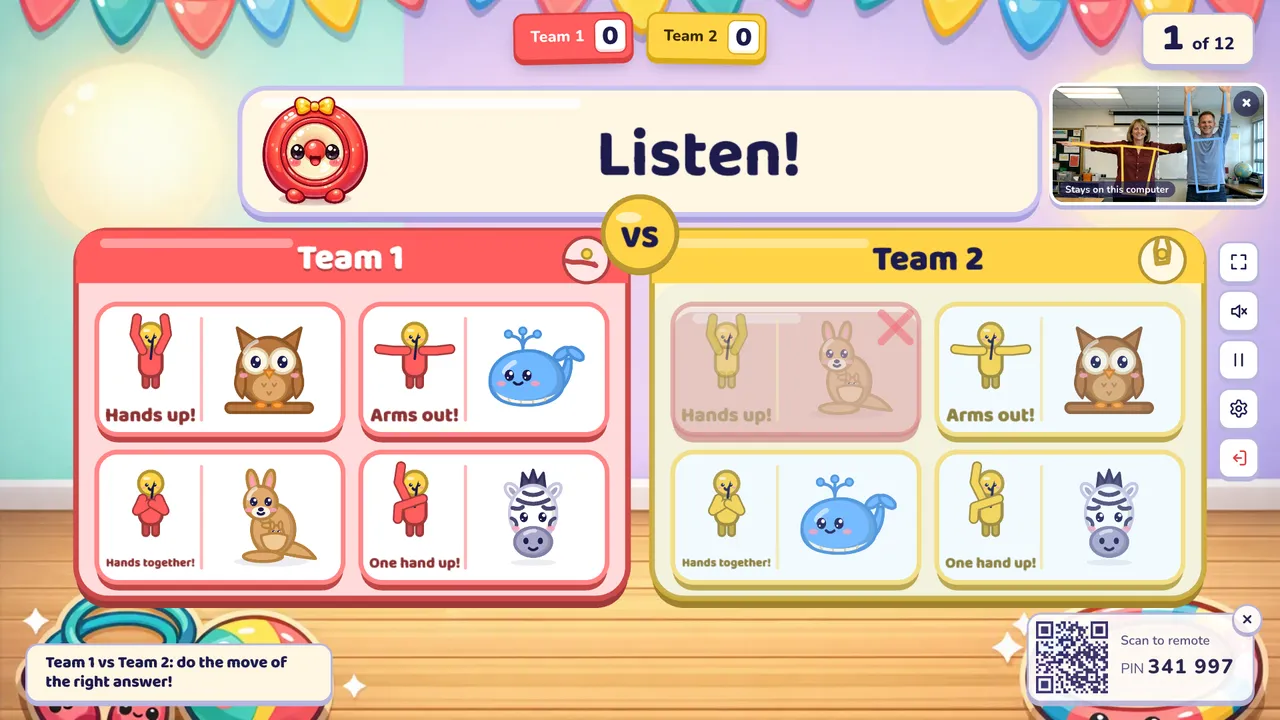
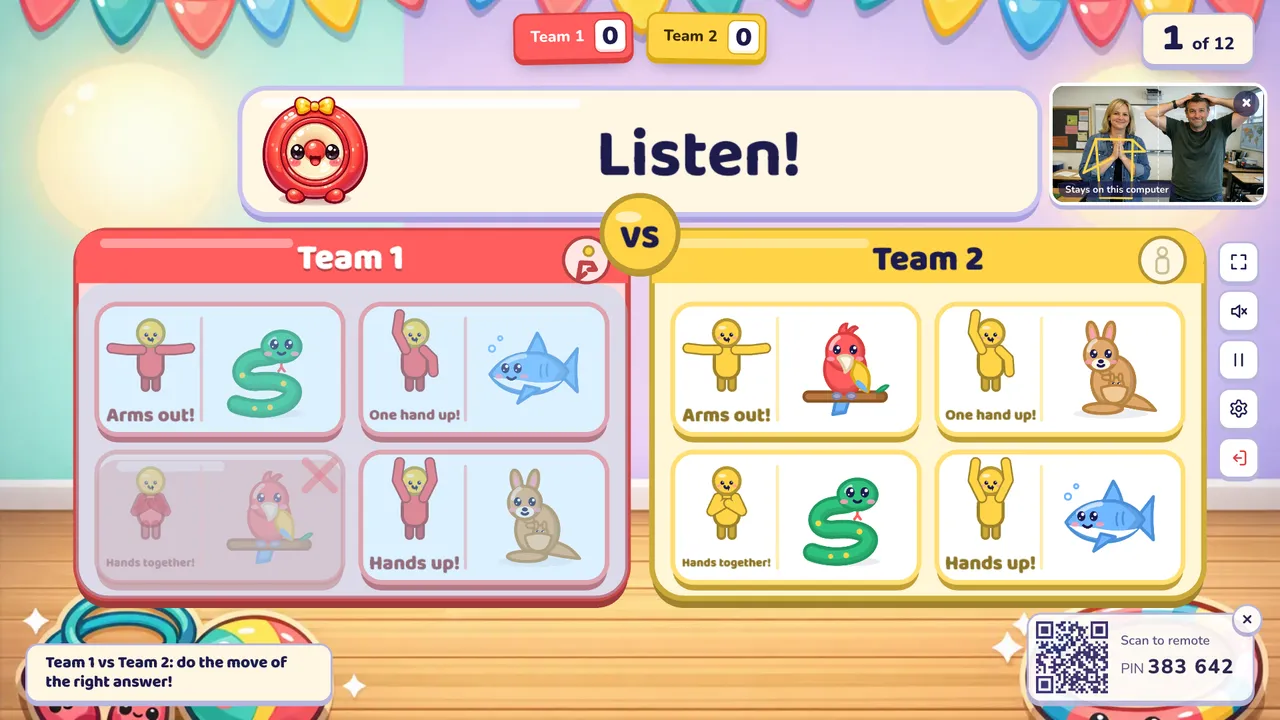
Oly Says is a movement game for the classroom that works like a quiz. Two students stand in front of the screen, one from each team, one on each half. Each half shows the same answers in a different order, and every answer card has a move beside it: hands up, one hand up, arms out, hands on head or hands together. The students find the right answer and do its move. The computer's camera sees the moves, and the first student to hold the right one wins the point. It is a brain break, a TPR (Total Physical Response) activity and a review game in one, and nobody needs a touch screen.
At a glance
| Players | The whole class in 2–4 teams free (up to 8 with Pro); two students in front of the camera each question |
| Time | 5–10 minutes for 12 questions |
| Works with | Any set: English words with pictures, meanings or listening, and subject sets (multiple choice and true or false) |
| Best for | Brain breaks, TPR in English lessons, PE warm-ups with a quiz, classes that need to move, projectors and TVs without touch |
| You need | A computer with a camera facing the class (the laptop's own webcam or a USB webcam), a projector, TV or display, room for two students 2–3 m from the camera, and your phone as the remote |
How to play Oly Says
- Make or pick a question set. Snap a textbook page, paste a word list or type a topic, or open a free set from the library.
- Pick Oly Says, set the teams and start. The camera is on by default for this game. Your browser asks once before it starts. Two students stand 2–3 m in front of the camera, side by side, so it sees them from the waist up: the left one plays for the team on the left, the right one for the team on the right.
- Play. Oly asks the question (or says the word out loud). Each student finds the right answer on their own half and does the move printed on that card. A bar under the card fills while they hold the move; after about half a second it counts. The right move wins the point, with stars and confetti. Then the next two students come up.
Rules and scoring
- First to hold the right move: 1 point for that team.
- Wrong move: that side freezes for about a second, so waving through every move doesn't pay. The other student can still win.
- A different order on each side. Both halves use the same moves in the same places, but the answers are shuffled, so the right answer has a different move on each side. Copying your neighbour does not work.
- New moves every question, so students have to read the card each time instead of learning one pose.
- Three or more teams: two teams face off each question, in turn, so every pair of teams meets. The hint in the corner says who is up.
- Double and triple questions are worth 2 or 3.
- Settings: a timer per question (off, 10, 20, 30 or 60 seconds; running out means nobody scores), hide the score, calm or no effects, camera on or off.
What you can teach with it
Oly Says works with every Oly set, so you can use it in any lesson.
- Listening at Pre-A1 and A1: Oly says "kangaroo", students find the picture and do its move.
- Pictures and meanings at A2 and B1: a picture or a meaning on the screen, the English words on the cards.
- The moves themselves: "hands up", "arms out", "hands on head" are classroom English, practised every question.
- Maths: "7 × 8" with four answers, each with its move.
- Science, history and geography: multiple choice and true or false questions. True or false shows two cards.
Tips from the classroom
- Put the camera at about chest height, facing the class, with light on the students' faces rather than behind them.
- Leave a gap between the two players so each stays clearly on their own half.
- Only the two players should stand in the camera's view. The camera follows the closest student on each half, so the rest of the class can sit, watch and do the moves along with them.
- Do the five moves together once before the first question, so everyone knows them.
- In a PE lesson, add a squat or a jump between questions for the whole class.
- No camera today? Switch it off in the settings: on a touch screen students touch the cards, and on a projector you tap the team that was first on your phone.
Play it without a screen
- Write four answers on the board and draw a stick figure doing a different move next to each.
- Say a word or read a question.
- Two students race to do the move of the right answer; you judge who was first.
- Keep the score in team columns.
The screen version picks new moves every question, shuffles each side, sees who held the right move first and keeps the score.
Questions teachers ask
Is Oly Says free?
Yes. Playing is free, with library games and your own typed questions. The free plan also includes 10 AI question sets a month (3 from photos).
How is it different from Simon Says?
In Simon Says students copy the move the leader calls, and the trick is the words "Simon says". In Oly Says the move is the answer: students have to know the right answer first, then do the move that goes with it. So it is a quiz you play standing up, and it works for any topic.
What camera do I need?
The webcam of the computer that runs the big screen is enough: a laptop's own camera or a USB webcam pointing at the class. Students stand about 2–3 m away so it sees them from the waist up. A recent computer and a recent browser work best.
Is the camera safe for students' privacy?
Yes. The camera picture is read inside your browser, on your computer, to find the shoulders, elbows and hands, and then thrown away. Nothing is uploaded, saved or used to recognise anyone. The small camera picture can be hidden, and closing the game switches the camera off. More in our privacy policy.
Can I play without a camera?
Yes. Switch the camera off in the game settings. On a touch screen students touch the cards; on a projector they point, and you tap the team that was first on your phone.
Does it work for maths and science?
Yes. Subject sets with multiple choice or true or false questions work, in the class's language.
Do students need devices?
No. The class plays on one shared screen. Only your phone is used, as the remote.
Can a team lose points?
No. A wrong move only freezes that side for a moment.
For more games where two students race, try Word Swat or Match Up, and see interactive whiteboard games and projector classroom games.